Mythkins
Mythweaver Studios - Course Project
Systems and Gameplay Programmer
September 2025 - Current
Gameplay video
Project Details
-
Unity 2022.3
-
9 person team
-
14 weeks development
Game Overview
In this mobile game, the player has inherited a sanctuary dedicated to rehabilitating injured mythological creatures. The player must care for a griffin, a kraken, and a cerberus to raise each's "affection scores" to fully rehabilitate each, while keeping the sanctuary in working order.
Gameplay is focused around 6 minigames and a racing game mode. Each mythological pet has a minigame dedicated to them that will raise their affection score, and parts of the sanctuary will randomly break each day and require fixing via one of three minigames. The goal is to get each pet to 150 affection points so they can leave the sanctuary, and keep the sanctuary from becoming too destroyed, all within a month, with only 12 hours a day. The player can also engage in a racing game mode to raise all the pets' affection scores. Each game takes up time each day.
Responsibilities and Code Examples
Player Movement and Interaction
The player moves with an on-screen joystick, and interacts with the game via touch input. Moving the joystick controls left/right/up/down movement on the normal player, and in the griffin minigame, left/right movement. The griffin also has added jumping functionality by tapping on the screen. Most other input is handled with buttons that appear above interactable objects like pets, broken sanctuary fixtures, and UI. Tapping on objects within minigames is handled via on-screen raycasts at the point of touch input. The game uses the new Unity input system.

Input Map for player movement and interaction. This uses touch controls and gets movement vectors from an on screen joystick
-
~5 hours
Left vs Right Oriented Joystick
The game supports accessibility features for left or right handedness, allowing the player to choose whether they want the joystick to appear on the left or right side of the screen from the main menu or settings menu. This is saved between gameplay sessions for player convenience. This also changes the UI layout within the game to adjust for the joystick position.
-
~7 hours
Video showing the left-oriented joystick option and subsequent UI changes

Code example for switching the side UI appears on depending on if a left or right joystick is enabled. This uses a combination of preset positions and the player's screen dimensions to determine the position of the UI elements, which are added to an array in editor if they must be altered. This ensures only relevant elements are affected and that they fit within the constraints of any screen size.
Save System
The game has a semi-automatic, semi-manual save system. When entering a new area in the sanctuary or entering a minigame, the game will save the player's data, and can also be saved via the pause menu in the sanctuary. The game saves the number of day the player has played through, how much time was left in their current day, how many pets the player has in the sanctuary currently, and each pets' data (animal type, name, affection score, and position in the sanctuary). This data can be loaded in new game sessions via the "Load" button in the main menu, and can be cleared with "New Game". Pet related data is saved in text files, everything else is saved in Player Prefs.
This system saves using text documents, with different documents used to save different collections of related data.
-
~25 hours
Video showing player preference for handedness of the joystick being saved and saving day/time, as well as the Cerberus pet's affection score and all pets' names

Code example for how each pet's data is saved. Each pet, when created, has a file path generated and added to a text file. This text file is iterated through when saving and loading to access each text file, writing each aspect of the pets' data to their respective file.
Ceiling Minigame
The minigame that the player completes to fix the ceiling involves debris falling from the top of the screen which the player must click on to "fix". If they let 5 pieces of debris drop below the bottom of the screen within 10 seconds, the game is lost. If they successfully let less than 5 fall, they win and the ceiling is fixed. The debris are dropped from an object pool at randomized positions within the screen's boundaries, at semi-random intervals that get quicker the longer the game is played. Debris pieces increase in scale as they drop to create the illusion of them getting closer.
Video gameplay for ceiling breaking and corresponding minigame
-
~5 hours
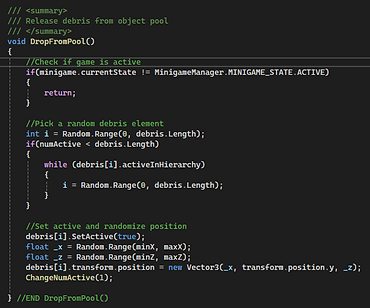
Code examples for dropping and releasing debris from the object pool
Griffin Minigame
The griffin minigame is a vertical platformer where the player plays as the griffin pet to jump on clouds and stay on screen until they reach the goal height of the game. The game creates the illusion of the camera moving upwards constantly, however to save resources the clouds move downward and a dropped from a pool at randomized positions and scales, returning to the pool when they leave the screen's bottom boundary. The griffin uses the joystick to move left and right, and taps on the opposite side of the screen as the joystick to jump. As they jump, the game calculates the distance between the cloud the griffin was on and the new cloud it has landed on, and using that to calculate how far left the griffin has to go. This is indicated with a progress bar on the side of the screen. The goal is 150 meters. Affection is awarded 5 points upon reaching the goal, and in intervals of 4 if the player falls off screen before reaching the goal.
-
~10 hours
Video gameplay of griffin minigame win state

Code example for calculating how far the player has to jump to win the minigame. It takes the position of the cloud the griffin was on and the position of the cloud the griffin has just landed on, and subtracts (or adds) this from the remaining distance, updating the UI accordingly